Formulare anpassen
In time cockpit können Sie neue Formulare anlegen und anpassen. Dafür stellt time cockpit eine XAML-basierte Sprache bereit, mit der Sie das Layout von Formularen definieren. Ein Formular dient zum Bearbeiten einer einzelnen Zeile einer Liste, z. B. eines Kunden oder einer Zeitbuchung. Zusätzlich kann ein Formular Listen mit zugehörigen Daten enthalten.
Aufbau eines Formulars
Formulare gliedern Daten auf drei Ebenen:
- Tab
- Abschnitt (Section)
- Abschnittsspalte (Section Column)
Jedes Formular muss mindestens einen Tab enthalten. Jeder Tab muss mindestens einen Abschnitt enthalten, und jeder Abschnitt muss mindestens eine Abschnittsspalte enthalten.
Innerhalb dieser Abschnittsspalten werden TimeCockpit.Data.DataModel.View.BoundCells oder davon abgeleitete Zellen verwendet, um Daten aus einer TimeCockpit.Data.DataModel.ModelEntity anzuzeigen.
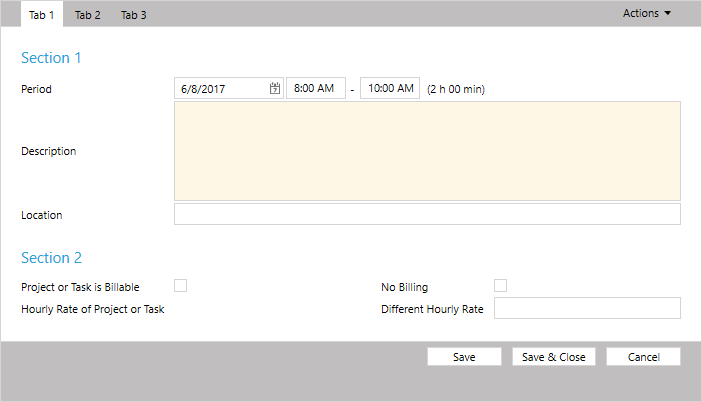
Neues Formular generieren
Wenn Sie ein neues Formular für eine TimeCockpit.Data.DataModel.ModelEntity generieren, wird ein Formular mit allen Eigenschaften und Beziehungen erzeugt:
<Form ModelEntityName="APP_Timesheet" xmlns="clr-namespace:TimeCockpit.Data.DataModel.View;assembly=TimeCockpit.Data">
  <Tab Header="=:FriendlyName('APP_Timesheet')">
    <Section Header="=:FriendlyName('APP_Timesheet')">
      <SectionColumn>
        <BoundCell Content="=Current.APP_BeginTime" />
        <BoundCell Content="=Current.APP_Description" />
        <BoundCell Content="=Current.APP_EndTime" />
        <BoundCell Content="=Current.APP_HourlyRate" />
        <BoundCell Content="=Current.APP_HourlyRateBilled" />
        <BoundCell Content="=Current.APP_IsDurationTimesheet" />
        <BoundCell Content="=Current.APP_JourneyDistance" />
        <BoundCell Content="=Current.APP_JourneyFrom" />
        <BoundCell Content="=Current.APP_JourneyTo" />
        <BoundCell Content="=Current.APP_Location" />
        <BoundCell Content="=Current.APP_NoBilling" />
        <BoundCell Content="=Current.APP_BeginTimeActual" />
        <BoundCell Content="=Current.APP_Billable" />
        <BoundCell Content="=Current.APP_Billed" />
        <BoundCell Content="=Current.APP_CompanyNameActual" />
        <BoundCell Content="=Current.APP_DateActual" />
        <BoundCell Content="=Current.APP_DurationInDays" />
        <BoundCell Content="=Current.APP_DurationInHours" />
        <BoundCell Content="=Current.APP_EndTimeActual" />
        <BoundCell Content="=Current.APP_HourlyRateActual" />
        <BoundCell Content="=Current.APP_HourlyRateProjectOrTask" />
        <BoundCell Content="=Current.APP_ProjectCodeActual" />
        <BoundCell Content="=Current.APP_ProjectOrTaskIsBillable" />
        <BoundCell Content="=Current.APP_Revenue" />
        <BoundCell Content="=Current.APP_Invoice" />
        <BoundCell Content="=Current.APP_JourneyMeansOfTransport" />
        <BoundCell Content="=Current.APP_Project" />
        <BoundCell Content="=Current.APP_Task" />
        <BoundCell Content="=Current.APP_UserDetail" />
        <BoundCell Content="=Current.APP_WorkingTimeWeight" />
      </SectionColumn>
    </Section>
  </Tab>
</Form>
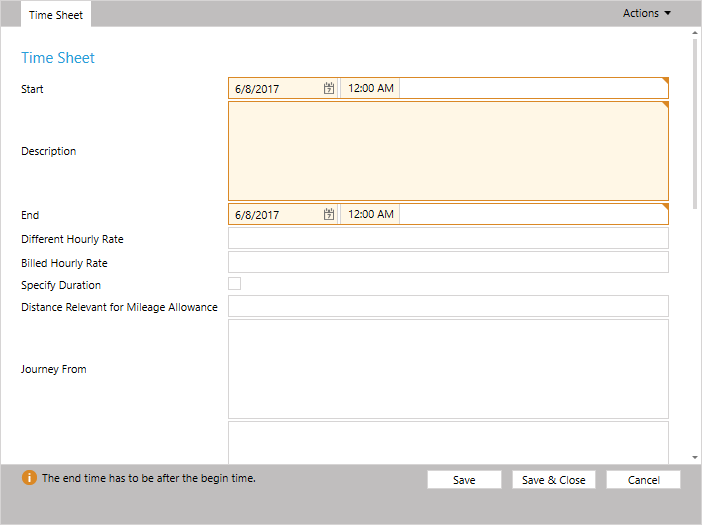
TimeCockpit.Data.DataModel.View.BoundCell versucht, für jede Eigenschaft und Beziehung der TimeCockpit.Data.DataModel.ModelEntity das passende Eingabesteuerelement zu erzeugen.
Bei TimeCockpit.Data.DataModel.TextPropertys bestimmt die Länge der Eigenschaft die Größe des Eingabefelds. Bei APP_Timesheet werden die Eigenschaften APP_Description, APP_JourneyFrom und APP_JourneyTo als große Textbereiche statt als einzeilige Textfelder angezeigt. Für einzeilige Textfelder verwenden Sie die TimeCockpit.Data.DataModel.View.TextCell statt einer TimeCockpit.Data.DataModel.View.BoundCell. Die TimeCockpit.Data.DataModel.View.BoundCell bietet eine Eigenschaft Height, mit der die Höhe explizit festgelegt werden kann. Ohne die Eigenschaft Height zeigen TimeCockpit.Data.DataModel.View.TextCells immer ein einzeiliges Textfeld an.
Abschnitte
Um das Formular zu gliedern, können Sie jedem Tab mehrere Abschnitte hinzufügen. Jeder Abschnitt muss mindestens eine Abschnittsspalte enthalten.
<Form ModelEntityName="APP_Timesheet" xmlns="clr-namespace:TimeCockpit.Data.DataModel.View;assembly=TimeCockpit.Data">
  <Tab Header="=:FriendlyName('APP_Timesheet')">
    <Section Header="=:FriendlyName('APP_Timesheet')">
      <SectionColumn>
        <BoundCell Content="=Current.APP_BeginTime" />
        <BoundCell Content="=Current.APP_EndTime" />
        <TextCell Content="=Current.APP_Description" />
        <BoundCell Content="=Current.APP_Location" />
        <BoundCell Content="=Current.APP_Project" />
        <BoundCell Content="=Current.APP_Task" />
      </SectionColumn>
    </Section>
    <Section Header="Billing">
      <SectionColumn>
        <BoundCell Content="=Current.APP_Billable" />
        <BoundCell Content="=Current.APP_HourlyRateProjectOrTask" />
        <BoundCell Content="=Current.APP_HourlyRate" />
        <BoundCell Content="=Current.APP_NoBilling" />
        <BoundCell Content="=Current.APP_Revenue" />
       </SectionColumn>
    </Section>
    <Section Header="Travel">
      <SectionColumn>
        <BoundCell Content="=Current.APP_JourneyMeansOfTransport" />
        <BoundCell Content="=Current.APP_JourneyDistance" />
        <BoundCell Content="=Current.APP_JourneyFrom" />
        <BoundCell Content="=Current.APP_JourneyTo" />
      </SectionColumn>
    </Section>
  </Tab>
</Form>
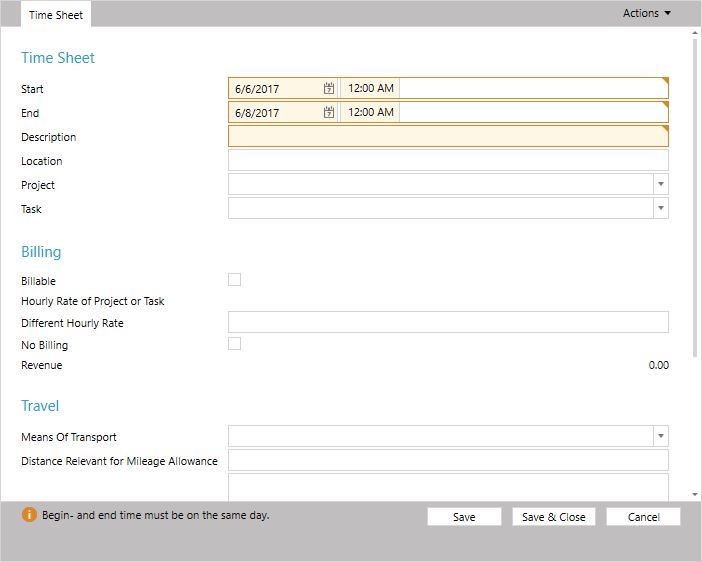
Abschnittsspalten
Mit TimeCockpit.Data.DataModel.View.SectionColumns können Sie einem Abschnitt mehrere Spalten hinzufügen. Mit ColSpan und RowSpan lassen Sie eine Zelle über mehrere Zeilen oder Spalten reichen.
<Form ModelEntityName="APP_Timesheet" xmlns="clr-namespace:TimeCockpit.Data.DataModel.View;assembly=TimeCockpit.Data">
  <Tab Header="=:FriendlyName('APP_Timesheet')">
    <Section Header="=:FriendlyName('APP_Timesheet')">
      <SectionColumn>
        <BoundCell Content="=Current.APP_BeginTime" />
        <TextCell Content="=Current.APP_Description" ColSpan="2" />
        <BoundCell Content="=Current.APP_Location" ColSpan="2" />
        <BoundCell Content="=Current.APP_Project" />
      </SectionColumn>
      <SectionColumn>
      	<BoundCell Content="=Current.APP_EndTime" />
      	<BoundCell Content="=Current.APP_Task" />
      </SectionColumn>
    </Section>
    <Section Header="Billing">
      <SectionColumn>
        <BoundCell Content="=Current.APP_Billable" />
        <BoundCell Content="=Current.APP_NoBilling" />
       </SectionColumn>
       <SectionColumn>
        <BoundCell Content="=Current.APP_HourlyRateProjectOrTask" />
      	<BoundCell Content="=Current.APP_HourlyRate" />
		<BoundCell Content="=Current.APP_Revenue" />
      </SectionColumn>
    </Section>
    <Section Header="Travel">
      <SectionColumn>
        <BoundCell Content="=Current.APP_JourneyMeansOfTransport" />
        <BoundCell Content="=Current.APP_JourneyDistance" />
        <BoundCell Content="=Current.APP_JourneyFrom" />
        <BoundCell Content="=Current.APP_JourneyTo" />
      </SectionColumn>
    </Section>
  </Tab>
</Form>
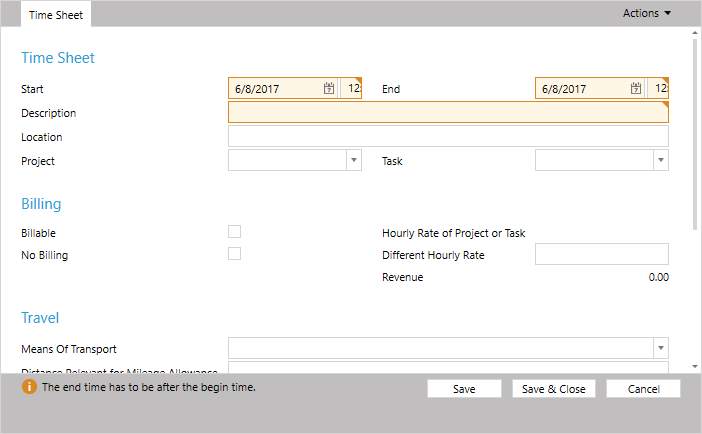
Ausdrücke in Zellen
Die meisten Eigenschaften von TimeCockpit.Data.DataModel.View.Cells erlauben Ausdrücke. Dazu muss der Ausdruck mit = beginnen:
<Form ModelEntityName="APP_Timesheet" xmlns="clr-namespace:TimeCockpit.Data.DataModel.View;assembly=TimeCockpit.Data">
  <Tab Header="Simple Calculation">
    <Section>
      <SectionColumn>
        <NumericCell Header="Result" Content="=2 + 2 * 4" />
      </SectionColumn>
    </Section>
  </Tab>
</Form>
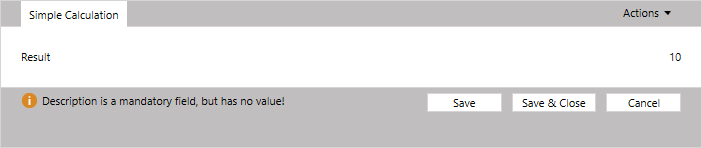
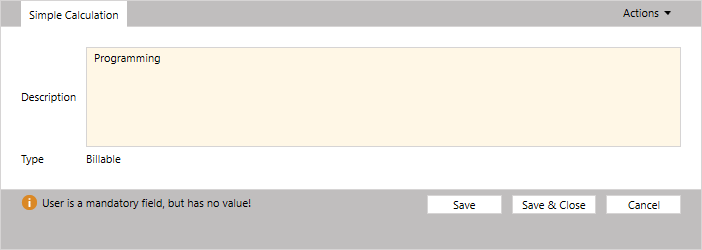
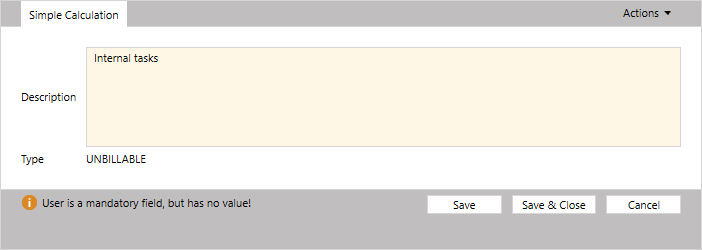
Die Ausdrücke können mit Current auch auf das aktuelle TimeCockpit.Data.EntityObject verweisen:
<Form ModelEntityName="APP_Timesheet" xmlns="clr-namespace:TimeCockpit.Data.DataModel.View;assembly=TimeCockpit.Data">
  <Tab Header="Simple Calculation">
    <Section>
      <SectionColumn>
        <BoundCell Content="=Current.APP_Description" />
        <TextCell Header="Type" Content="=:Iif(Current.APP_Description = 'Internal tasks', 'UNBILLABLE', 'Billable')" />
      </SectionColumn>
    </Section>
  </Tab>
</Form>
Cell und BoundCell
Alle TimeCockpit.Data.DataModel.View.Cells, die in einem Formular verwendet werden können, sind von TimeCockpit.Data.DataModel.View.Cell abgeleitet. TimeCockpit.Data.DataModel.View.Cell und alle abgeleiteten Klassen bieten folgende Eigenschaften zur Konfiguration:
| Name | Beschreibung |
|---|---|
RowSpan |
Anzahl der Zeilen einer Zelle. |
ColSpan |
Anzahl der Abschnittsspalten einer Zelle. |
Header |
Die Beschriftung der Zelle. |
IsVisible |
Gibt an, ob die Zelle sichtbar ist. |
IsEnabled |
Gibt an, ob das Eingabesteuerelement aktiviert ist. |
IsReadOnly |
Gibt an, ob ein Eingabesteuerelement oder ein schreibgeschützter Wert wie in Listen angezeigt wird. |
TextCell
Mit der TimeCockpit.Data.DataModel.View.TextCell können Sie die Höhe eines Textfelds in Pixeln festlegen.
BooleanCell
Die TimeCockpit.Data.DataModel.View.BooleanCell kann die Werte True, False und Null anzeigen.
NumericCell
Mit der TimeCockpit.Data.DataModel.View.NumericCell können Sie das NumberFormatPattern für die angezeigten Zahlen festlegen. Alle zulässigen Muster finden Sie unter MSDN Decimal.ToString().
DateCell und DateTimeCell
Die TimeCockpit.Data.DataModel.View.DateCell und die TimeCockpit.Data.DataModel.View.DateTimeCell zeigen in Formularen eine Datumsauswahl an, mit der Datum und Uhrzeit ausgewählt werden.
RelationCell
Die TimeCockpit.Data.DataModel.View.RelationCell zeigt ein Kombinationsfeld mit allen Werten einer verknüpften Tabelle an. Mit DisplayProperty wählen Sie die anzuzeigende Eigenschaft aus, und mit der Eigenschaft List verwenden Sie eine Liste als Datenquelle für das Kombinationsfeld.
Mit der Eigenschaft SortDirection können Sie die Einträge im Kombinationsfeld sortieren. Sie wird nur verwendet, wenn keine Standardliste für Beziehungen definiert ist und die Eigenschaft List nicht verwendet wird. Wird eine Liste als Datenquelle verwendet, gilt die Sortierung der Liste.
Zusätzlich können Sie bei TimeCockpit.Data.DataModel.View.RelationCells eine Condition angeben, um die Werte des Kombinationsfelds zu filtern. Die Condition kann auf Werte des aktuellen TimeCockpit.Data.EntityObject verweisen. Im Standardformular APP_TimesheetForm wird die Condition verwendet, um nur Projekte anzuzeigen, die nicht abgeschlossen sind, und nur Tätigkeiten, die zum aktuell ausgewählten Projekt gehören:
<Section Header="=:Translate('Form.APP_TimesheetForm.ProjectSection')">
    <SectionColumn>
        <RelationCell Condition="Current.Closed = False" Content="=Current.APP_Project" />
        <RelationCell Condition="=:Iif(Current.Project = Null, '1 = 0', 'Current.Project = Null Or Current.Project.ProjectUuid={' + Current.Project.ProjectUuid + '}') + ' And (Current.Closed = Null Or Current.Closed = False)'" Content="=Current.APP_Task" LookupCondition="=:Iif(Current.Project = Null, '1 = 0', 'Current.Project = Null Or Current.Project.ProjectUuid={' + Current.Project.ProjectUuid + '}')" />
    </SectionColumn>
</Section>
Weitere Zelltypen
time cockpit bietet noch weitere TimeCockpit.Data.DataModel.View.Cells. Alle verfügbaren Zelltypen finden Sie in der API-Dokumentation (TimeCockpit.Data.DataModel.View.Cell).